➡️ Exact delivery dates may vary, so some features may not be immediately available on the publication date. For your specific access dates, please contact your LivePerson account team.
🚨The timing and scope of all changes remain at the sole discretion of LivePerson and are subject to change.
Boost engagement with RCS quick replies
We are excited to announce a major enhancement to our RCS Business Messaging channel: Quick Replies. This feature is the first step in our rich content roadmap and is designed to make your automated conversations more intuitive, guided, and effortless for your customers.
What are quick replies?
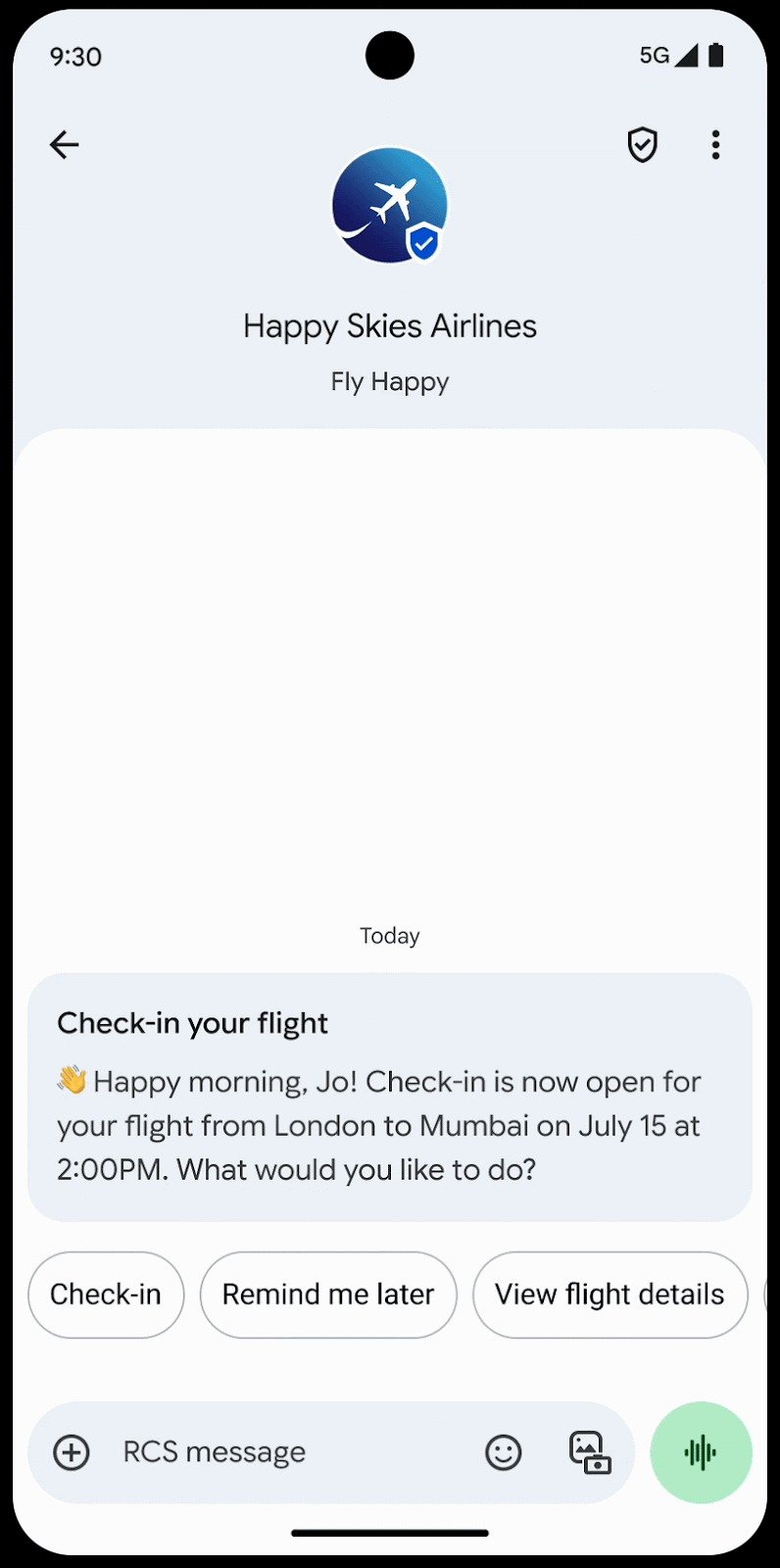
Quick replies transform the text-only conversation by presenting your customers with a set of tappable buttons, allowing them to respond without typing.
When you send a message with quick replies, the user sees your question or statement followed by a list of suggested responses. When a user taps a button (e.g., "Check-in"), it sends that pre-defined text value back to your bot or agent as a standard message.
Key benefits
- Reduce customer effort: Allow users to respond with a single tap, eliminating typing errors and frustration.
- Improve bot containment: Guide users down a defined conversational path, reducing "I don't understand" errors and agent escalations.
- Increase engagement: Make conversations faster and more interactive, reducing the chance of customer drop-off.
- Speed up resolution: Get the exact information you need from the customer instantly, without relying on them to type a specific keyword.
Common use cases
- Main menu navigation: Guide users when they first start a chat, e.g., "Check Order Status," "Billing Questions," "Speak to Agent."
- Yes/No confirmations: Quickly confirm information or actions, e.g., "Are you sure you want to cancel?" → "Yes, cancel" / "No, go back."
- Topic or category selection: Allow users to select a product, service, or reason for their inquiry, e.g., "Which product are you asking about?" → "Flights," "Baggage," "Rewards."
- Survey and feedback: Easily capture CSAT or survey responses, e.g., "Was this helpful?" → "Yes" / "No."
Get started with RCS
Don't have RCS Business Messaging yet? These new rich features are just one part of this powerful channel. To begin the onboarding process, complete our Brand Interest Form.
Get started with quick replies on RCS
You can add quick reply interactions to your RCS conversational flows in Conversation Builder. Quick Replies can also be configured to be sent by agents via widgets.
For the complete JSON template, code examples, and a full list of properties, please refer to the official documentation on our Developer Center.